Savings Goal Tracker for Google Sheets: Track Several Goals at Once
Published October 24, 2026 · ⏱️ 2 min read · Printable Resource Guide
Download free file
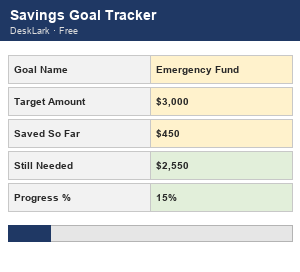
A savings goal tracker only needs to answer one question well: how close am I, and how much more do I need? The free template below tracks exactly one goal — name it, set a target, update what you've saved, and two formulas (Still Needed, Progress %) do the rest.
Set it up in three fields
- Download the free spreadsheet and open it in Google Sheets (File → Import → Upload) or Excel.
- Replace the demo goal ("Emergency Fund," $3,000 target, $450 saved) with your own name and target amount.
- Update "Saved So Far" every time you add money — Still Needed and Progress % recalculate instantly, no formulas to touch.
With the demo numbers, Still Needed comes out to $2,550 and Progress % to 15% ($450 of $3,000) — that's the whole mechanism; your own goal will just have different numbers in those same two cells.
Why the demo uses an emergency fund
An emergency fund is usually the first goal worth tracking before anything else — 3 to 6 months of essential expenses set aside so a single car repair or medical bill doesn't go straight onto a credit card. It's a good goal to practice the tracker on because the target is simple to picture (a multiple of your monthly expenses) and the payoff is immediate peace of mind rather than a future purchase.
The real problem: most people have more than one goal
An emergency fund, a vacation, and a house down payment are all "savings," but they compete for the same monthly dollars, and a single-goal tracker can't show you that trade-off — it only ever tells you about the one goal you typed in. The moment you're saving for two things at once, you need to see them side by side to decide where this month's extra $200 should actually go.
When you outgrow the free template
The free version handles exactly one goal with no deadline. If you're juggling several goals — each with its own category, deadline and a monthly-savings-needed number so you know exactly how much to set aside for each one this month — the Savings Goal Tracker (Google Sheets) tracks up to 25 goals at once, with deadline status (on track / soon / overdue / reached) and a dashboard showing your total monthly savings need across every goal combined. A browser-app version is also available if you'd rather not use a spreadsheet at all.
More to explore
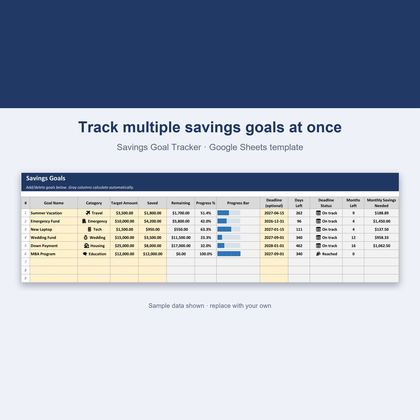
Savings Goal Tracker — Google Sheets & Excel
Track multiple goals with deadlines and monthly amounts needed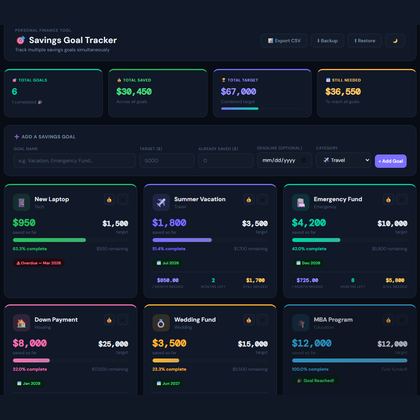
Savings Goal Tracker — Browser App
Track several savings goals with deadlines in your browserFAQ
Does the free template track more than one goal?
No — it's intentionally a single-goal tracker. The full Savings Goal Tracker handles up to 25 goals at once, each with its own category and deadline.
Does the free template have a deadline field?
No deadline in the free version — it only tracks target amount, amount saved, and progress percentage. The full tracker adds deadlines with on-track/overdue status per goal.
How is "Still Needed" calculated?
Target Amount minus Saved So Far (and it won't show a negative number if you've saved past your target).
What's a reasonable first savings goal to track?
An emergency fund of 3-6 months of essential expenses is the most commonly recommended starting goal, before vacation funds or other discretionary savings.
Do I need a Google account to use this?
Yes, to use Google Sheets (free to create). The file also works fully in Microsoft Excel.